Configure Column/Properties Labels
KwikWork allows administrators to configure the column names and property labels of cards that are displayed in the search results grid. In order to configure this features, administrators must make changes to the metadata.js file that in contained within the NLS folder of the KwikWork Engine to map the symbolic name of the property to a new display name. Once configured, KwikWork will use the name configured in the NLS file instead of the FileNet display name. The following are the steps to update the metadata.js NLS file to change the labels displays for properties in the column names and property cards in the KwikWork search results grid.
- Navigate to the root NLS folder located in the kwcn-engine.ear at 'kwcn-engine.ear\kwcn-web.war\ux\nls'
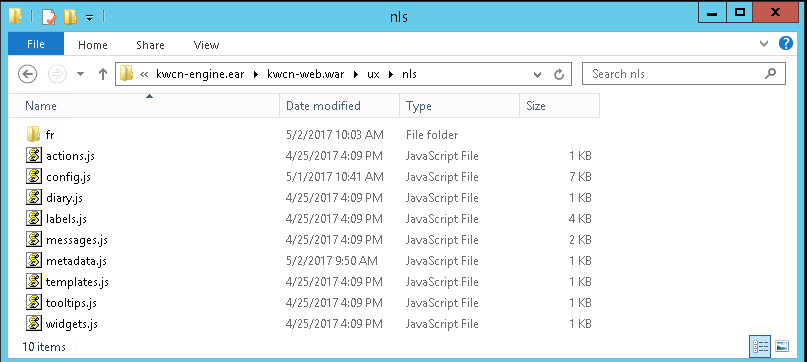
- Open the 'metadata.js' file in a text editor such as Notepad++ or Vi.
- Add new lines in the 'root' segment of the file for any properties that need to be configured with new display names following the convention of "<Property Symbolic Name>: 'Display Name'
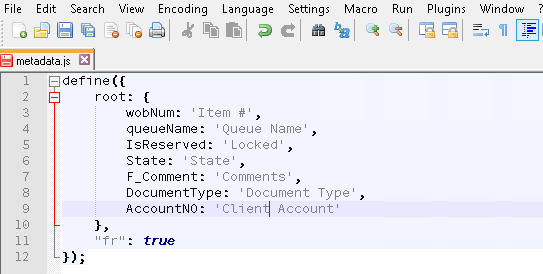
- Once the changes have been saved, save the file then restart the WebSphere node where KwikWork is installed.
Note: Since the NLS file is contained within the kwcn-engine.ear' folder, it should be backed up before updating then used to replace the one installed by the KwikWork installer.